Показаны сообщения с ярлыком firefox. Показать все сообщения

среда, 9 ноября 2011 г.

Firefox. Delete cookies for a single site


Delete cookies for a single site

To delete cookies for one site:
  1. At the top of the Firefox window, click on the Firefox button (Tools menu in Windows XP) and then click Options.
  2. Select the Privacy panel.
  3. Set Firefox will: to Use custom settings for history. 
 4. Click Show Cookies.... The Cookies window will appear.


5. In the Search: field, type the name of the site whose cookies you want to remove. The cookies that match your search will be displayed.

6. Select the cookie(s) in the list to remove and click Remove Cookie.


 Select the first cookie and press Shift+End to select all the cookies in the list.
7. Click Close to close the Cookies window.

support.mozilla.com

понедельник, 31 октября 2011 г.

Firefox: Change Address Bar Search Provider

When Firefox performs a search from the Address Bar, it queries the search engine string you have setup within Firefox. If it’s using Yahoo, you can switch to Google. Don’t like Google? Use DuckDuckGo. Here’s how to switch which search engine Firefox searches when you use the address bar to search.

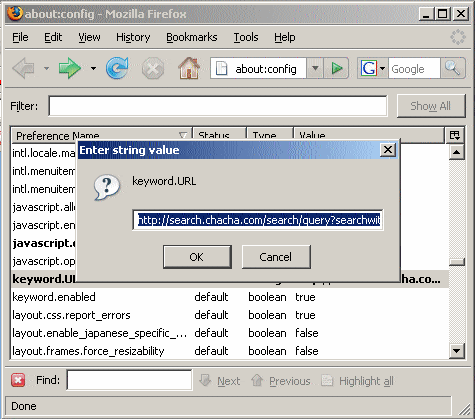
1. In Firefox type about:config in the address bar and press ENTER.

2. Locate and double-click the entry for keyword.URL

3. Set the value based on which search provider you would like to use for your address bar searches. Here are a few search strings you can use.

Google: http://www.google.com/search?&q=

Yahoo: http://search.yahoo.com/search?p=
Ask: http://www.ask.com/web?q=
Bing: http://www.bing.com/search?ie=UTF-8&oe=UTF-8&sourceid=navclient&gfns=1&q=
DuckDuckGo: http://duckduckgo.com/?q=
ChaCha: http://www.chacha.com/search/ 


Technipages.com/firefox-change-address-bar-search-provider.html